We added an AI assistant to our app. It gave good answers, but people kept saying it was slow. The funny part? The model wasn't actually that slow. The problem was how we showed the answer.
Our first version waited for the AI to finish its entire reply, then dumped it on the screen all at once. For a long answer, that meant staring at a spinner for several seconds. Users thought it was broken and clicked again.
The fix was streaming: show the answer word by word as the model writes it, just like ChatGPT or Claude do. Same model, same total time — but the first words show up almost right away. Here's how I built it with React and Node, and what changed.
How streaming works
There are three pieces: the React app, a small Node server in the middle, and the AI model.
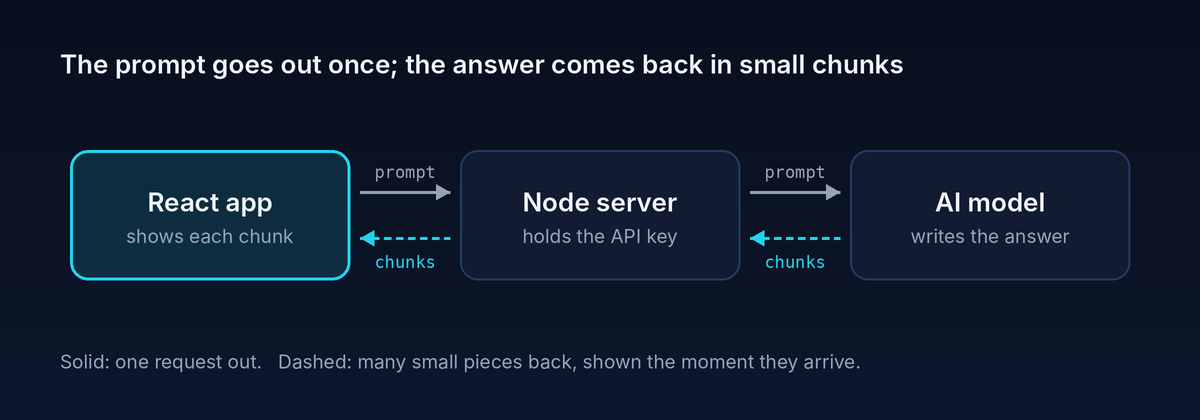
The browser sends the question once. The server passes it to the model. Then, instead of waiting for the full reply, the model sends back tiny pieces of text as it writes them. The server forwards each piece straight to the browser, and React adds it to the screen.
Why have a server in the middle at all? Because your AI API key must never live in frontend code. Anyone can open DevTools and steal it.
The backend: pass the stream through
Most AI model APIs can send their reply in small chunks instead of one big response. The backend's job is simple: ask the model for a stream, then forward each chunk to the browser as soon as it arrives.
I kept the API key on the server (never in the frontend), and used a plain Node/Express route:
app.post("/api/chat", async (req, res) => {
  res.setHeader("Content-Type", "text/plain; charset=utf-8");
  res.setHeader("Cache-Control", "no-cache");

  const controller = new AbortController();
  // If the user closes the tab or hits Stop, stop asking the model
  req.on("close", () => controller.abort());

  try {
    // streamFromModel wraps your AI provider's streaming SDK
    const stream = await streamFromModel(req.body.messages, {
      signal: controller.signal,
    });

    for await (const textChunk of stream) {
      res.write(textChunk); // send it the moment we get it
    }
  } catch (err) {
    if (!controller.signal.aborted) res.write("\n[Something went wrong]");
  } finally {
    res.end();
  }
});
Two things worth calling out:
res.write()instead ofres.json().res.json()waits for everything.res.write()sends each piece right away.- Abort on close. If the user leaves, we stop the model call. That saves money, because you pay for every token the model generates — even ones nobody reads.
The frontend: reading the stream in React
In the browser, fetch already supports streams. Instead of calling await res.json(), you grab a reader from res.body and read chunks in a loop.
I put this in a custom hook so any component could use it:
import { useState, useRef } from "react";

export function useStreamingChat() {
  const [answer, setAnswer] = useState("");
  const [isStreaming, setIsStreaming] = useState(false);
  const abortRef = useRef(null);

  async function ask(messages) {
    setAnswer("");
    setIsStreaming(true);
    abortRef.current = new AbortController();

    try {
      const res = await fetch("/api/chat", {
        method: "POST",
        headers: { "Content-Type": "application/json" },
        body: JSON.stringify({ messages }),
        signal: abortRef.current.signal,
      });

      const reader = res.body.getReader();
      const decoder = new TextDecoder();

      while (true) {
        const { done, value } = await reader.read();
        if (done) break;
        // stream: true handles characters split across chunks (like emoji)
        const text = decoder.decode(value, { stream: true });
        setAnswer((prev) => prev + text);
      }
    } catch (err) {
      if (err.name !== "AbortError") setAnswer((prev) => prev + "\n[Error]");
    } finally {
      setIsStreaming(false);
    }
  }

  function stop() {
    abortRef.current?.abort();
  }

  return { answer, isStreaming, ask, stop };
}
And using it in a component is just:
const { answer, isStreaming, ask, stop } = useStreamingChat();
The one line people often miss is decoder.decode(value, { stream: true }). Without stream: true, an emoji or accented character that gets split across two chunks comes out as garbage.
Polish: the details that make it feel good
The basic version worked, but three extra changes made a real difference.
1. Don't re-render on every chunk. A model can send dozens of tiny chunks per second. Calling setAnswer for each one means dozens of re-renders, and if you're rendering Markdown, that adds up fast. I collect chunks in a ref and flush them once per animation frame:
const bufferRef = useRef("");
const frameRef = useRef(null);

function pushText(text) {
  bufferRef.current += text;
  if (frameRef.current) return; // a flush is already scheduled
  frameRef.current = requestAnimationFrame(() => {
    const chunk = bufferRef.current;
    bufferRef.current = "";
    frameRef.current = null;
    setAnswer((prev) => prev + chunk);
  });
}
Now the UI updates at most about 60 times a second, no matter how fast the chunks come in.
2. Add a Stop button. Long answers sometimes go the wrong way. A Stop button that calls stop() aborts the fetch, and the server's req.on("close") stops the model too. Users love having control, and it cuts wasted tokens.
3. Auto-scroll, but politely. Scroll to the bottom as new text arrives — unless the user has scrolled up to reread something. Nothing is more annoying than being yanked back down while you're reading:
useEffect(() => {
  const el = containerRef.current;
  const nearBottom = el.scrollHeight - el.scrollTop - el.clientHeight < 80;
  if (nearBottom) el.scrollTop = el.scrollHeight;
}, [answer]);
One more small thing: I added aria-live="polite" on the answer container so screen readers announce the reply without interrupting the user.
What I learned
- Perceived speed matters more than actual speed. Showing progress early beats finishing a little faster.
- Streaming is mostly a frontend problem. The backend just passes chunks through. The real work is rendering them smoothly.
- Batch your updates. Fast streams plus React state can mean a lot of re-renders.
requestAnimationFramefixes that cheaply. - Give users control. A Stop button and polite auto-scroll make an AI feature feel trustworthy, not pushy.
- Keep keys on the server. Never call an AI API straight from the browser with your secret key.
AI features are quickly becoming a normal part of frontend work. The model gives you the answer, but the frontend decides whether it feels like magic or like waiting.
Building something with AI in your frontend? I'd love to hear what you're working on. Drop a comment or message me on LinkedIn.